WarTip
ToolTip for the Cursor
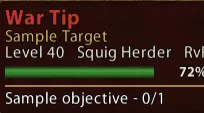
A unit tooltip that follows the cursor. It shows the name, NPC title, level and career, RvR flag, and health. /wartip toggles it. /wartip options opens the style window for the outline, background texture, reaction colors, opacity, and the health bar texture. While War Tip is on, the default unit mouseover stays hidden and skill tips stay on the normal tooltip spot. Quest Mob Tip lines show inside this tip when that addon is on.
Note: Can integrate QuestMobTip into WarTip
- Status
- Approved
- Latest
- 1.1.9
- Game version
- 1.4.8
- Downloads
- 32
- Forum
- Discussion thread
1.1.9
stable• The cursor gap is the same for friendly, hostile, and neutral. The tip's top-left follows the pointer, and the box grows down and to the right. • The cursor offset sliders still move it. The default is 16 across and 8 down. • Color the outline by reaction draws a solid rim. Brass, Iron, Night, Bone, Black, and Parchment draw that same rim. Thickness 0 hides it. • Metal plate and Parchment backgrounds draw again. Solid color is unchanged.
1.1.7
stable• Turning War Tip off brings the default mouseover background back. The name, difficulty, and level stay on that plate. • While War Tip is on, the default unit mouseover stays hidden. Skill tooltips at that spot still show. • The hidden background no longer stays gone after War Tip is turned off.
1.1.6
stable• A unit tooltip follows the cursor. It can show the name, NPC title, level and career, RvR flag, health, and Quest Mob Tip lines while that addon is on. • /wartip and /wt toggle it. on and off set it. options, option, and config open the style window. • While War Tip is on, the default unit mouseover is hidden, including its text. Skill tips stay on the normal tooltip spot. Turning War Tip off brings the default mouseover back. Quest Mob Tip uses its own window again when War Tip is off. • The style window has General, Backdrop, Bars, and Text. A preview sits beside the window. • Backdrop: outline thickness from 0 to 12. Thickness 0 removes the outline. Outline colors are Brass, Iron, Night, Bone, Black, and Parchment. The outline can follow friend, foe, or neutral, or keep a chosen color. Background reaction is separate. Plate colors are Night, Iron, Black, and Parchment. Backgrounds are a solid color, the metal plate, or parchment. • Opacity 0 leaves the background about 10% solid. Opacity 100 is fully solid. The name, health bar, and outline stay solid. • Bars: show or hide the health bar and its percent, and set the bar height. Fills are a solid color, player health, enemy health, action points, experience, renown, or a custom file at Assets/Texture/WarTipBar.tga (256 by 32). Health coloring can be turned off. The health bar texture menu draws above the page text. • Text: the name can use friend, foe, or neutral. NPC titles stay brass. The level line keeps the con color. • Settings are saved per character. Defaults keep the night plate, a 2px reaction-colored outline, a solid health bar, and full opacity.
| Version | Channel | Status | Published | Size | |
|---|---|---|---|---|---|
| 1.1.9 | stable | Published | 1 Nov 2026 | 15 KB | |
| 1.1.7 | stable | Published | 1 Nov 2026 | 14 KB | |
| 1.1.6 | stable | Published | 1 Nov 2026 | 14 KB |
Cursor tooltip for units. /wartip options opens the style window. Quest Mob Tip lines appear inside it while that addon is on.
WarTip · 4 files
· by woobie - EA_ChatWindow (built in)
- EASystem_TargetInfo (built in)
- woobie Owner


No comments yet.
Log in to comment.